



NVME USB drives Realtek RTL9210/RTL9220 Firmware Version 1.xx
- Laroldski
-

- Offline
- Big Poster
-

Enregistré
- Posts: 69
- Thanks: 23
Re: NVME USB drives Realtek RTL9210/RTL9220 Firmware Version 1.xx
2 years 1 week ago
@TheGiolly I tried doing what you said but the new file I made just made my enclosure's board fail and I had to do a reset by shorting the 2 pin's in the one chip,can you take a look at the original .cfg file and the one I made and tell me if there is something you can see.
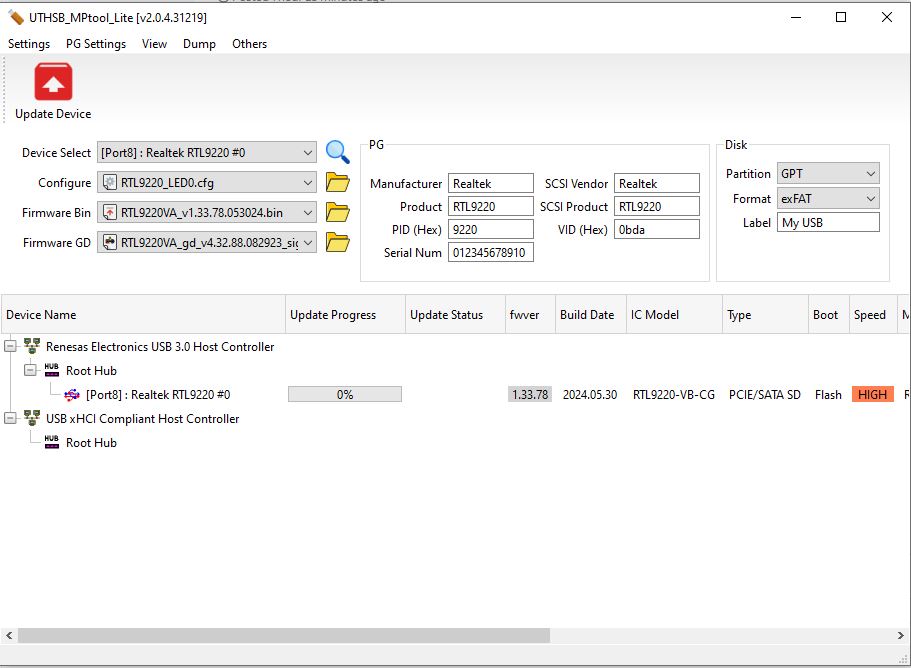
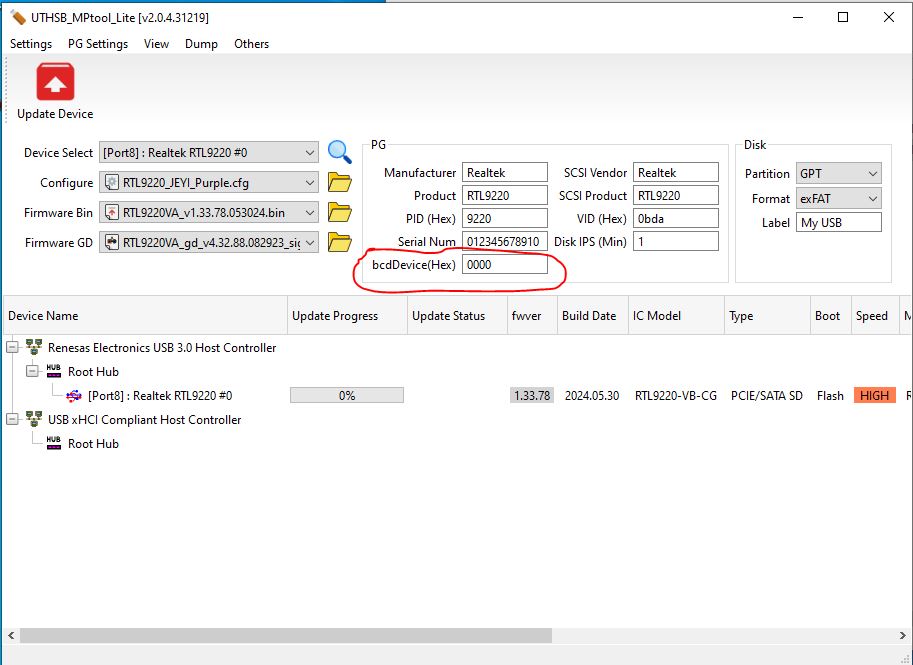
Also if you look at the first picture I have used the included RTL9220_LED0.cfg file and it works fine with my enclosure and the enclosure works in everyway the way it should,but if I try and use the the setting's from the original dump file I get a new box in the firmware tool that I circled in red and the box say's bcdDevice(Hex)
Original file settings
U2PHY : n/a
U3PHY : n/a
VID : 0x0bda
PID : 0x9220
MANUFACTURE : "Realtek"
PRODUCT : "RTL9220"
SERIAL : "012345678910"
SCSI_PRODUCT : "RTL9220 "
SCSI_VENDOR : "Realtek "
USB_SELF_PWR : n/a
DISK_HOTPLUG : n/a
LED : 0x01
PINMUX1 : n/a
PINMUX2 : n/a
U2_MAXPWR : n/a
U3_MAXPWR : n/a
ASPMDIS : n/a
PCIE_REFCLK : n/a
DISK_IPS_THRES : 0x01
SWR_1_2V : n/a
EN_UPS : n/a
PD : n/a
CUSTOMIZED_LED : 33 00 00 00 00 00 00 00 00 00 00 00 00 00 00
SUSPEND_LED_OFF : n/a
FORCE_USB_SPEED : n/a
FORCE_PCIE_SPEED : n/a
EN_U1U2 : n/a
FORCE_USB_QUIRK : n/a
FORCE_PCIE_QUIRK : n/a
FAN : n/a
DIS_SHOW_EMPTY_DISK : n/a
FORCE_SATA_NORMAL_DMA : n/a
UART_DBG_PIN : 0x64
FINGER_PRINT_EN : n/a
RM_INTERNAL_RD : n/a
HS_AUTO_SWITCH : n/a
UART_BAUD_RATE : 0x0000e100
CUSTOMIZED_DISK_IDENTIFY : n/a
HW_LED_CFG : n/a
CDROM_CFG : n/a
SUPPORT_HID : n/a
LATE_INIT_DISK : n/a
SCSI_WP_PIN : 0x0b
SD_MMC_TYPE : n/a
FORCE_PORT_TYPE : n/a
BCDDEVICE : n/a
SUSPEND_DISK_OFF : 0x07
SCSI_WB_PIN : n/a
CUSTOMIZED_FEATURE : n/a
PERIPH_API : 0x01
RAID_CFG : n/a
Boot Mode : Flash
FW Ver : 1.32.82
FW Build Date : 2023.08.11
IC Pkg Type : PCIE/SATA SD
UUID : n/a
Disconn_ForceUSB2 : false
Changed file settings
U2PHY = n/a
U3PHY = n/a
VID = 0x0bda
PID = 0x9220
MANUFACTURE = "Realtek"
PRODUCT = "RTL9220"
SERIAL = "012345678910"
SCSI_PRODUCT = "RTL9220 "
SCSI_VENDOR = "Realtek "
USB_SELF_PWR = n/a
DISK_HOTPLUG = n/a
LED = 0x01
PINMUX1 = n/a
PINMUX2 = n/a
U2_MAXPWR = n/a
U3_MAXPWR = n/a
ASPMDIS = n/a
PCIE_REFCLK = n/a
DISK_IPS_THRES = 0x01
SWR_1_2V = n/a
EN_UPS = n/a
PD = n/a
CUSTOMIZED_LED = 33 00 00 00 00 00 00 00 00 00 00 00 00 00 00
SUSPEND_LED_OFF = n/a
FORCE_USB_SPEED = n/a
FORCE_PCIE_SPEED = n/a
EN_U1U2 : n/a
FORCE_USB_QUIRK = n/a
FORCE_PCIE_QUIRK = n/a
FAN : n/a
DIS_SHOW_EMPTY_DISK = n/a
FORCE_SATA_NORMAL_DMA = n/a
UART_DBG_PIN = 0x64
FINGER_PRINT_EN = n/a
RM_INTERNAL_RD = n/a
HS_AUTO_SWITCH = n/a
UART_BAUD_RATE = 0x0000e100
CUSTOMIZED_DISK_IDENTIFY = n/a
HW_LED_CFG = n/a
CDROM_CFG = n/a
SUPPORT_HID = n/a
LATE_INIT_DISK = n/a
SCSI_WP_PIN = 0x0b
SD_MMC_TYPE = n/a
FORCE_PORT_TYPE = n/a
BCDDEVICE = n/a
SUSPEND_DISK_OFF = 0x07
SCSI_WB_PIN = n/a
CUSTOMIZED_FEATURE = n/a
PERIPH_API = 0x01
RAID_CFG = n/a
Boot Mode = Flash
FW Ver = 1.32.82
FW Build Date = 2023.08.11
IC Pkg Type = PCIE/SATA SD
UUID = n/a
Disconn_ForceUSB2 = false
[img][img]https://i.imgur.com/DtoYvcf.jpg[/img][/img]
Also if you look at the first picture I have used the included RTL9220_LED0.cfg file and it works fine with my enclosure and the enclosure works in everyway the way it should,but if I try and use the the setting's from the original dump file I get a new box in the firmware tool that I circled in red and the box say's bcdDevice(Hex)
Original file settings
U2PHY : n/a
U3PHY : n/a
VID : 0x0bda
PID : 0x9220
MANUFACTURE : "Realtek"
PRODUCT : "RTL9220"
SERIAL : "012345678910"
SCSI_PRODUCT : "RTL9220 "
SCSI_VENDOR : "Realtek "
USB_SELF_PWR : n/a
DISK_HOTPLUG : n/a
LED : 0x01
PINMUX1 : n/a
PINMUX2 : n/a
U2_MAXPWR : n/a
U3_MAXPWR : n/a
ASPMDIS : n/a
PCIE_REFCLK : n/a
DISK_IPS_THRES : 0x01
SWR_1_2V : n/a
EN_UPS : n/a
PD : n/a
CUSTOMIZED_LED : 33 00 00 00 00 00 00 00 00 00 00 00 00 00 00
SUSPEND_LED_OFF : n/a
FORCE_USB_SPEED : n/a
FORCE_PCIE_SPEED : n/a
EN_U1U2 : n/a
FORCE_USB_QUIRK : n/a
FORCE_PCIE_QUIRK : n/a
FAN : n/a
DIS_SHOW_EMPTY_DISK : n/a
FORCE_SATA_NORMAL_DMA : n/a
UART_DBG_PIN : 0x64
FINGER_PRINT_EN : n/a
RM_INTERNAL_RD : n/a
HS_AUTO_SWITCH : n/a
UART_BAUD_RATE : 0x0000e100
CUSTOMIZED_DISK_IDENTIFY : n/a
HW_LED_CFG : n/a
CDROM_CFG : n/a
SUPPORT_HID : n/a
LATE_INIT_DISK : n/a
SCSI_WP_PIN : 0x0b
SD_MMC_TYPE : n/a
FORCE_PORT_TYPE : n/a
BCDDEVICE : n/a
SUSPEND_DISK_OFF : 0x07
SCSI_WB_PIN : n/a
CUSTOMIZED_FEATURE : n/a
PERIPH_API : 0x01
RAID_CFG : n/a
Boot Mode : Flash
FW Ver : 1.32.82
FW Build Date : 2023.08.11
IC Pkg Type : PCIE/SATA SD
UUID : n/a
Disconn_ForceUSB2 : false
Changed file settings
U2PHY = n/a
U3PHY = n/a
VID = 0x0bda
PID = 0x9220
MANUFACTURE = "Realtek"
PRODUCT = "RTL9220"
SERIAL = "012345678910"
SCSI_PRODUCT = "RTL9220 "
SCSI_VENDOR = "Realtek "
USB_SELF_PWR = n/a
DISK_HOTPLUG = n/a
LED = 0x01
PINMUX1 = n/a
PINMUX2 = n/a
U2_MAXPWR = n/a
U3_MAXPWR = n/a
ASPMDIS = n/a
PCIE_REFCLK = n/a
DISK_IPS_THRES = 0x01
SWR_1_2V = n/a
EN_UPS = n/a
PD = n/a
CUSTOMIZED_LED = 33 00 00 00 00 00 00 00 00 00 00 00 00 00 00
SUSPEND_LED_OFF = n/a
FORCE_USB_SPEED = n/a
FORCE_PCIE_SPEED = n/a
EN_U1U2 : n/a
FORCE_USB_QUIRK = n/a
FORCE_PCIE_QUIRK = n/a
FAN : n/a
DIS_SHOW_EMPTY_DISK = n/a
FORCE_SATA_NORMAL_DMA = n/a
UART_DBG_PIN = 0x64
FINGER_PRINT_EN = n/a
RM_INTERNAL_RD = n/a
HS_AUTO_SWITCH = n/a
UART_BAUD_RATE = 0x0000e100
CUSTOMIZED_DISK_IDENTIFY = n/a
HW_LED_CFG = n/a
CDROM_CFG = n/a
SUPPORT_HID = n/a
LATE_INIT_DISK = n/a
SCSI_WP_PIN = 0x0b
SD_MMC_TYPE = n/a
FORCE_PORT_TYPE = n/a
BCDDEVICE = n/a
SUSPEND_DISK_OFF = 0x07
SCSI_WB_PIN = n/a
CUSTOMIZED_FEATURE = n/a
PERIPH_API = 0x01
RAID_CFG = n/a
Boot Mode = Flash
FW Ver = 1.32.82
FW Build Date = 2023.08.11
IC Pkg Type = PCIE/SATA SD
UUID = n/a
Disconn_ForceUSB2 = false
[img][img]https://i.imgur.com/DtoYvcf.jpg[/img][/img]
Please Log in or Create an account to join the conversation.
- Laroldski
-
- Offline
- Big Poster
-
Enregistré
- Posts: 69
- Thanks: 23
Re: NVME USB drives Realtek RTL9210/RTL9220 Firmware Version 1.xx
2 years 1 week ago
@TheGiolly These are the pictures here where the new box opens up.


Please Log in or Create an account to join the conversation.
- Laroldski
-
- Offline
- Big Poster
-
Enregistré
- Posts: 69
- Thanks: 23
Re: NVME USB drives Realtek RTL9210/RTL9220 Firmware Version 1.xx
2 years 1 week agoThe firmware only works on the RTL9220VA chipset, I don't know if yourIs is the RTL9220A or others.
From what I'm seeing with mine it's a RTL9220-VB-CG,if I use the included RTL9220_LED0.cfg file and my enclosure fine with no problems at all but if I try and use my back dump file it fails every time and I have to short the 2 pins and reset.
The first picture is the showing the firmware version and was never flashed yetand the firmware version is v132.82,the second picture shows it flashed with the new v133.78


Please Log in or Create an account to join the conversation.
- TheGiolly
-
- Offline
- poster 3
-

Enregistré
- Posts: 10
- Thanks: 3
Re: NVME USB drives Realtek RTL9210/RTL9220 Firmware Version 1.xx
2 years 1 week ago - 2 years 1 week ago
Try using this config.
I just removed the last few lines.
U2PHY = n/a
U3PHY = n/a
VID = 0x0bda
PID = 0x9220
MANUFACTURE = "Realtek"
PRODUCT = "RTL9220"
SERIAL = "012345678910"
SCSI_PRODUCT = "RTL9220 "
SCSI_VENDOR = "Realtek "
USB_SELF_PWR = n/a
DISK_HOTPLUG = n/a
LED = 0x01
PINMUX1 = n/a
PINMUX2 = n/a
U2_MAXPWR = n/a
U3_MAXPWR = n/a
ASPMDIS = n/a
PCIE_REFCLK = n/a
DISK_IPS_THRES = 0x01
SWR_1_2V = n/a
EN_UPS = n/a
PD = n/a
CUSTOMIZED_LED = 33 00 00 00 00 00 00 00 00 00 00 00 00 00 00
SUSPEND_LED_OFF = n/a
FORCE_USB_SPEED = n/a
FORCE_PCIE_SPEED = n/a
EN_U1U2 : n/a
FORCE_USB_QUIRK = n/a
FORCE_PCIE_QUIRK = n/a
FAN : n/a
DIS_SHOW_EMPTY_DISK = n/a
FORCE_SATA_NORMAL_DMA = n/a
UART_DBG_PIN = 0x64
FINGER_PRINT_EN = n/a
RM_INTERNAL_RD = n/a
HS_AUTO_SWITCH = n/a
UART_BAUD_RATE = 0x0000e100
CUSTOMIZED_DISK_IDENTIFY = n/a
HW_LED_CFG = n/a
CDROM_CFG = n/a
SUPPORT_HID = n/a
LATE_INIT_DISK = n/a
SCSI_WP_PIN = 0x0b
SD_MMC_TYPE = n/a
FORCE_PORT_TYPE = n/a
BCDDEVICE = n/a
SUSPEND_DISK_OFF = 0x07
SCSI_WB_PIN = n/a
CUSTOMIZED_FEATURE = n/a
PERIPH_API = 0x01
RAID_CFG = n/a
I just removed the last few lines.
U2PHY = n/a
U3PHY = n/a
VID = 0x0bda
PID = 0x9220
MANUFACTURE = "Realtek"
PRODUCT = "RTL9220"
SERIAL = "012345678910"
SCSI_PRODUCT = "RTL9220 "
SCSI_VENDOR = "Realtek "
USB_SELF_PWR = n/a
DISK_HOTPLUG = n/a
LED = 0x01
PINMUX1 = n/a
PINMUX2 = n/a
U2_MAXPWR = n/a
U3_MAXPWR = n/a
ASPMDIS = n/a
PCIE_REFCLK = n/a
DISK_IPS_THRES = 0x01
SWR_1_2V = n/a
EN_UPS = n/a
PD = n/a
CUSTOMIZED_LED = 33 00 00 00 00 00 00 00 00 00 00 00 00 00 00
SUSPEND_LED_OFF = n/a
FORCE_USB_SPEED = n/a
FORCE_PCIE_SPEED = n/a
EN_U1U2 : n/a
FORCE_USB_QUIRK = n/a
FORCE_PCIE_QUIRK = n/a
FAN : n/a
DIS_SHOW_EMPTY_DISK = n/a
FORCE_SATA_NORMAL_DMA = n/a
UART_DBG_PIN = 0x64
FINGER_PRINT_EN = n/a
RM_INTERNAL_RD = n/a
HS_AUTO_SWITCH = n/a
UART_BAUD_RATE = 0x0000e100
CUSTOMIZED_DISK_IDENTIFY = n/a
HW_LED_CFG = n/a
CDROM_CFG = n/a
SUPPORT_HID = n/a
LATE_INIT_DISK = n/a
SCSI_WP_PIN = 0x0b
SD_MMC_TYPE = n/a
FORCE_PORT_TYPE = n/a
BCDDEVICE = n/a
SUSPEND_DISK_OFF = 0x07
SCSI_WB_PIN = n/a
CUSTOMIZED_FEATURE = n/a
PERIPH_API = 0x01
RAID_CFG = n/a
Last edit: 2 years 1 week ago by TheGiolly.
Please Log in or Create an account to join the conversation.
- Laroldski
-
- Offline
- Big Poster
-
Enregistré
- Posts: 69
- Thanks: 23
Re: NVME USB drives Realtek RTL9210/RTL9220 Firmware Version 1.xx
2 years 1 week ago
@TheGiolly that did work it just failed again,I don't know if you looked at the picture put up for admin to look at but you can see circled in red it say's bcdDevice(Hex)there is also something that say's Disk IPS(Min)1 in the screen shot I took that isn't in the original .cfg file and I delete those lines as well and the box's went away for them as well and that still didn't help.
Please Log in or Create an account to join the conversation.
Time to create page: 0.084 seconds