



NVME USB drives Realtek RTL9210/RTL9220 Firmware Version 1.xx
- p33994451
-

- Offline
- Newbie
-

Enregistré
- Posts: 1
- Thanks: 0
Re: NVME USB drives Realtek RTL9210/RTL9220 Firmware Version 1.xx
2 years 11 months ago - 2 years 11 months ago
I'd like to ask if anyone has purchased a similar version that comes with a fan?
www.lazada.com.ph/products/m2-nvme-ngff-...XajTE.364bnXajnXajTE
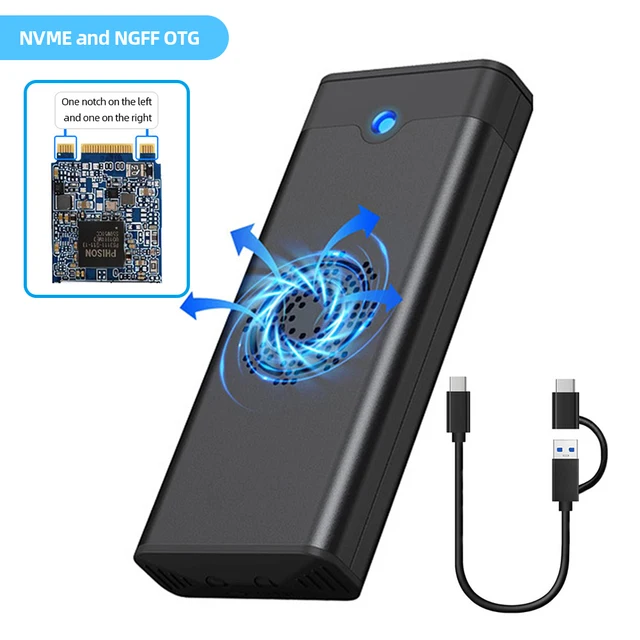
The original firmware was 1.32.16, and I flashed the latest version, 1.32.87. Originally, the fan would spin, but now it doesn't. I asked the seller, and they said that this temperature-controlled fan is not related to the firmware; it should activate when the temperature is high. However, I feel like it might not be the case.Below is my original configuration file.
**************************************************************
Device : [Port4] : Realtek RTL9210B-CG #0
**************************************************************
U2PHY : 02 f4 9b e0 e1
U3PHY : 02 d4 09 00 d5 00 80
VID : 0x0bda
PID : 0x9210
MANUFACTURE : "Realtek"
PRODUCT : "RTL9210B-CG"
SERIAL : "012345680151"
SCSI_PRODUCT : "RTL9210B-CG "
SCSI_VENDOR : "Realtek "
USB_SELF_PWR : n/a
DISK_HOTPLUG : 0x00
LED : 0x03
PINMUX1 : 0x00000000
PINMUX2 : 0x00000000
U2_MAXPWR : 0xfa
U3_MAXPWR : 0x70
ASPMDIS : 0x00
PCIE_REFCLK : n/a
DISK_IPS_THRES : 0x05
SWR_1_2V : n/a
EN_UPS : n/a
PD : n/a
CUSTOMIZED_LED : n/a
SUSPEND_LED_OFF : n/a
FORCE_USB_SPEED : n/a
FORCE_PCIE_SPEED : n/a
EN_U1U2 : n/a
FORCE_USB_QUIRK : n/a
FORCE_PCIE_QUIRK : n/a
FAN : 0x00000001
DIS_SHOW_EMPTY_DISK : 0x01
FORCE_SATA_NORMAL_DMA : n/a
UART_DBG_PIN : 0x05
FINGER_PRINT_EN : n/a
RM_INTERNAL_RD : n/a
HS_AUTO_SWITCH : n/a
UART_BAUD_RATE : n/a
CUSTOMIZED_DISK_IDENTIFY : n/a
HW_LED_CFG : n/a
CDROM_CFG : n/a
SUPPORT_HID : n/a
LATE_INIT_DISK : n/a
SCSI_WP_PIN : n/a
SD_MMC_TYPE : n/a
FORCE_PORT_TYPE : n/a
BCDDEVICE : n/a
SUSPEND_DISK_OFF : n/a
SCSI_WB_PIN : n/a
CUSTOMIZED_FEATURE : n/a
PERIPH_API : n/a
RAID_CFG : n/a
Boot Mode : Flash
FW Ver : 1.32.16
FW Build Date : 2023.01.09
IC Pkg Type : PCIE/SATA
UUID : n/a
Disconn_ForceUSB2 : false
**The configuration file after the update is as follows
:**************************************************************
Device : [Port19] : Realtek RTL9210B-CG #0
**************************************************************
U2PHY : 02 f4 9b e0 e1
U3PHY : 02 d4 09 00 d5 00 80
VID : 0x0bda
PID : 0x9210
MANUFACTURE : "Realtek"
PRODUCT : "RTL9210B-CG"
SERIAL : "012345680152"
SCSI_PRODUCT : "RTL9210B-CG "
SCSI_VENDOR : "Realtek "
USB_SELF_PWR : n/a
DISK_HOTPLUG : n/a
LED : 0x03
PINMUX1 : 0x00000000
PINMUX2 : 0x00000000
U2_MAXPWR : 0xfa
U3_MAXPWR : 0x70
ASPMDIS : 0x00
PCIE_REFCLK : n/a
DISK_IPS_THRES : n/a
SWR_1_2V : n/a
EN_UPS : n/a
PD : n/a
CUSTOMIZED_LED : n/a
SUSPEND_LED_OFF : n/a
FORCE_USB_SPEED : n/a
FORCE_PCIE_SPEED : n/a
EN_U1U2 : 0x01
FORCE_USB_QUIRK : n/a
FORCE_PCIE_QUIRK : n/a
FAN : n/a
DIS_SHOW_EMPTY_DISK : n/a
FORCE_SATA_NORMAL_DMA : n/a
UART_DBG_PIN : n/a
FINGER_PRINT_EN : n/a
RM_INTERNAL_RD : n/a
HS_AUTO_SWITCH : n/a
UART_BAUD_RATE : n/a
CUSTOMIZED_DISK_IDENTIFY : n/a
HW_LED_CFG : n/a
CDROM_CFG : n/a
SUPPORT_HID : n/a
LATE_INIT_DISK : n/a
SCSI_WP_PIN : n/a
SD_MMC_TYPE : n/a
FORCE_PORT_TYPE : n/a
BCDDEVICE : n/a
SUSPEND_DISK_OFF : n/a
SCSI_WB_PIN : n/a
CUSTOMIZED_FEATURE : n/a
PERIPH_API : n/a
RAID_CFG : n/a
Boot Mode : Flash
FW Ver : 1.32.87
FW Build Date : 2023.08.29
IC Pkg Type : PCIE/SATA
UUID : n/a
*******
I've already tried adjusting the fan settings, hoping it would start working after the firmware update, but the values still show as "n/a" after the update. I hope someone who has purchased a similar device or other friends can help me out! Thanks!
www.lazada.com.ph/products/m2-nvme-ngff-...XajTE.364bnXajnXajTE
The original firmware was 1.32.16, and I flashed the latest version, 1.32.87. Originally, the fan would spin, but now it doesn't. I asked the seller, and they said that this temperature-controlled fan is not related to the firmware; it should activate when the temperature is high. However, I feel like it might not be the case.Below is my original configuration file.
**************************************************************
Device : [Port4] : Realtek RTL9210B-CG #0
**************************************************************
U2PHY : 02 f4 9b e0 e1
U3PHY : 02 d4 09 00 d5 00 80
VID : 0x0bda
PID : 0x9210
MANUFACTURE : "Realtek"
PRODUCT : "RTL9210B-CG"
SERIAL : "012345680151"
SCSI_PRODUCT : "RTL9210B-CG "
SCSI_VENDOR : "Realtek "
USB_SELF_PWR : n/a
DISK_HOTPLUG : 0x00
LED : 0x03
PINMUX1 : 0x00000000
PINMUX2 : 0x00000000
U2_MAXPWR : 0xfa
U3_MAXPWR : 0x70
ASPMDIS : 0x00
PCIE_REFCLK : n/a
DISK_IPS_THRES : 0x05
SWR_1_2V : n/a
EN_UPS : n/a
PD : n/a
CUSTOMIZED_LED : n/a
SUSPEND_LED_OFF : n/a
FORCE_USB_SPEED : n/a
FORCE_PCIE_SPEED : n/a
EN_U1U2 : n/a
FORCE_USB_QUIRK : n/a
FORCE_PCIE_QUIRK : n/a
FAN : 0x00000001
DIS_SHOW_EMPTY_DISK : 0x01
FORCE_SATA_NORMAL_DMA : n/a
UART_DBG_PIN : 0x05
FINGER_PRINT_EN : n/a
RM_INTERNAL_RD : n/a
HS_AUTO_SWITCH : n/a
UART_BAUD_RATE : n/a
CUSTOMIZED_DISK_IDENTIFY : n/a
HW_LED_CFG : n/a
CDROM_CFG : n/a
SUPPORT_HID : n/a
LATE_INIT_DISK : n/a
SCSI_WP_PIN : n/a
SD_MMC_TYPE : n/a
FORCE_PORT_TYPE : n/a
BCDDEVICE : n/a
SUSPEND_DISK_OFF : n/a
SCSI_WB_PIN : n/a
CUSTOMIZED_FEATURE : n/a
PERIPH_API : n/a
RAID_CFG : n/a
Boot Mode : Flash
FW Ver : 1.32.16
FW Build Date : 2023.01.09
IC Pkg Type : PCIE/SATA
UUID : n/a
Disconn_ForceUSB2 : false
**The configuration file after the update is as follows
:**************************************************************
Device : [Port19] : Realtek RTL9210B-CG #0
**************************************************************
U2PHY : 02 f4 9b e0 e1
U3PHY : 02 d4 09 00 d5 00 80
VID : 0x0bda
PID : 0x9210
MANUFACTURE : "Realtek"
PRODUCT : "RTL9210B-CG"
SERIAL : "012345680152"
SCSI_PRODUCT : "RTL9210B-CG "
SCSI_VENDOR : "Realtek "
USB_SELF_PWR : n/a
DISK_HOTPLUG : n/a
LED : 0x03
PINMUX1 : 0x00000000
PINMUX2 : 0x00000000
U2_MAXPWR : 0xfa
U3_MAXPWR : 0x70
ASPMDIS : 0x00
PCIE_REFCLK : n/a
DISK_IPS_THRES : n/a
SWR_1_2V : n/a
EN_UPS : n/a
PD : n/a
CUSTOMIZED_LED : n/a
SUSPEND_LED_OFF : n/a
FORCE_USB_SPEED : n/a
FORCE_PCIE_SPEED : n/a
EN_U1U2 : 0x01
FORCE_USB_QUIRK : n/a
FORCE_PCIE_QUIRK : n/a
FAN : n/a
DIS_SHOW_EMPTY_DISK : n/a
FORCE_SATA_NORMAL_DMA : n/a
UART_DBG_PIN : n/a
FINGER_PRINT_EN : n/a
RM_INTERNAL_RD : n/a
HS_AUTO_SWITCH : n/a
UART_BAUD_RATE : n/a
CUSTOMIZED_DISK_IDENTIFY : n/a
HW_LED_CFG : n/a
CDROM_CFG : n/a
SUPPORT_HID : n/a
LATE_INIT_DISK : n/a
SCSI_WP_PIN : n/a
SD_MMC_TYPE : n/a
FORCE_PORT_TYPE : n/a
BCDDEVICE : n/a
SUSPEND_DISK_OFF : n/a
SCSI_WB_PIN : n/a
CUSTOMIZED_FEATURE : n/a
PERIPH_API : n/a
RAID_CFG : n/a
Boot Mode : Flash
FW Ver : 1.32.87
FW Build Date : 2023.08.29
IC Pkg Type : PCIE/SATA
UUID : n/a
*******
I've already tried adjusting the fan settings, hoping it would start working after the firmware update, but the values still show as "n/a" after the update. I hope someone who has purchased a similar device or other friends can help me out! Thanks!
Last edit: 2 years 11 months ago by p33994451.
Please Log in or Create an account to join the conversation.
- admin
-
 Topic Author
- Online
- Admin
-

Administrateur
- Fdrsoft (Admin)
- Posts: 671
- Thanks: 421
Re: NVME USB drives Realtek RTL9210/RTL9220 Firmware Version 1.xx
2 years 11 months ago
It is possible that it is not linked to the firmware and that it has a CTN or a probe, you will have to check with a hair dryer to see if it triggers

Asus Z890 ProArt, Intel Cpu Core Ultra 7 265K, Memoires 32Go Corsair DDR5 (6000Mhz CL30), Water-cooling Thermaright, nVidia Geforce RTX4060, Alimentation Gigabyte 850W, Samsung SSD 990 Pro, SSD9100 Pro, Steelserie Pro , Souris Razer, Boitier HUMMER, HP Steelserie, Free Fibre Ultra (8Go/8Go), Lan 10Gb, Cable CAT8/7, Switch 10/5/2.5Gbps, Casque Philips Fedelis.
Please Log in or Create an account to join the conversation.
- sdefrwggerg
-

- Offline
- Big Poster
-

Enregistré
- Posts: 42
- Thanks: 24
Re: NVME USB drives Realtek RTL9210/RTL9220 Firmware Version 1.xx
2 years 11 months ago - 2 years 11 months ago
Enclosure with or without fan On=0x1 Off=0x0
FAN = 0x0
In your new Settings you turn Fan off
Find the difference between yours two config her : [url] www.diffchecker.com/mUiHLaxf/ [/url]
This are the right Settings:
U2PHY : 02 f4 9b e0 e1
U3PHY : 02 d4 09 00 d5 00 80
VID : 0x0bda
PID : 0x9210
MANUFACTURE : "Realtek"
PRODUCT : "RTL9210B-CG"
SERIAL : "012345680150"
SCSI_PRODUCT : "RTL9210B-CG "
SCSI_VENDOR : "Realtek "
USB_SELF_PWR : n/a
DISK_HOTPLUG : 0x00
LED : 0x03
PINMUX1 : 0x00000000
PINMUX2 : 0x00000000
U2_MAXPWR : 0xfa
U3_MAXPWR : 0x70
ASPMDIS : 0x00
PCIE_REFCLK : n/a
DISK_IPS_THRES : 0x5
SWR_1_2V : n/a
EN_UPS : n/a
PD : n/a
CUSTOMIZED_LED : n/a
SUSPEND_LED_OFF : n/a
FORCE_USB_SPEED : n/a
FORCE_PCIE_SPEED : n/a
EN_U1U2 : 0x0
FORCE_USB_QUIRK : n/a
FORCE_PCIE_QUIRK : n/a
FAN : 0x1
DIS_SHOW_EMPTY_DISK : 0x1
FORCE_SATA_NORMAL_DMA : n/a
UART_DBG_PIN : 0x5
FINGER_PRINT_EN : n/a
RM_INTERNAL_RD : n/a
HS_AUTO_SWITCH : n/a
UART_BAUD_RATE : n/a
CUSTOMIZED_DISK_IDENTIFY : n/a
HW_LED_CFG : n/a
CDROM_CFG : n/a
SUPPORT_HID : n/a
LATE_INIT_DISK : n/a
SCSI_WP_PIN : n/a
SD_MMC_TYPE : n/a
FORCE_PORT_TYPE : n/a
BCDDEVICE : n/a
SUSPEND_DISK_OFF : n/a
SCSI_WB_PIN : n/a
CUSTOMIZED_FEATURE : n/a
PERIPH_API : n/a
RAID_CFG : n/a
FAN = 0x0
In your new Settings you turn Fan off
Find the difference between yours two config her : [url] www.diffchecker.com/mUiHLaxf/ [/url]
This are the right Settings:
U2PHY : 02 f4 9b e0 e1
U3PHY : 02 d4 09 00 d5 00 80
VID : 0x0bda
PID : 0x9210
MANUFACTURE : "Realtek"
PRODUCT : "RTL9210B-CG"
SERIAL : "012345680150"
SCSI_PRODUCT : "RTL9210B-CG "
SCSI_VENDOR : "Realtek "
USB_SELF_PWR : n/a
DISK_HOTPLUG : 0x00
LED : 0x03
PINMUX1 : 0x00000000
PINMUX2 : 0x00000000
U2_MAXPWR : 0xfa
U3_MAXPWR : 0x70
ASPMDIS : 0x00
PCIE_REFCLK : n/a
DISK_IPS_THRES : 0x5
SWR_1_2V : n/a
EN_UPS : n/a
PD : n/a
CUSTOMIZED_LED : n/a
SUSPEND_LED_OFF : n/a
FORCE_USB_SPEED : n/a
FORCE_PCIE_SPEED : n/a
EN_U1U2 : 0x0
FORCE_USB_QUIRK : n/a
FORCE_PCIE_QUIRK : n/a
FAN : 0x1
DIS_SHOW_EMPTY_DISK : 0x1
FORCE_SATA_NORMAL_DMA : n/a
UART_DBG_PIN : 0x5
FINGER_PRINT_EN : n/a
RM_INTERNAL_RD : n/a
HS_AUTO_SWITCH : n/a
UART_BAUD_RATE : n/a
CUSTOMIZED_DISK_IDENTIFY : n/a
HW_LED_CFG : n/a
CDROM_CFG : n/a
SUPPORT_HID : n/a
LATE_INIT_DISK : n/a
SCSI_WP_PIN : n/a
SD_MMC_TYPE : n/a
FORCE_PORT_TYPE : n/a
BCDDEVICE : n/a
SUSPEND_DISK_OFF : n/a
SCSI_WB_PIN : n/a
CUSTOMIZED_FEATURE : n/a
PERIPH_API : n/a
RAID_CFG : n/a
Last edit: 2 years 11 months ago by sdefrwggerg.
Please Log in or Create an account to join the conversation.
- Wolfspam
-
- Offline
- Poster 2
-

Enregistré
- Posts: 6
- Thanks: 1
Re: NVME USB drives Realtek RTL9210/RTL9220 Firmware Version 1.xx
2 years 10 months ago
Tried the new 1.32.87.082923 and the configuration file would not auto load or manually load for the Orico TCM2-C3-BL-BP Clear blue case, and ORICO-TCM2-C3-RD-BP Red clear case.
1.32.49 worked as expected as it did with all my previous enclosures.
One came originally with 1.24.2 other 1.23.15
One came originally with 1.24.2 other 1.23.15
Please Log in or Create an account to join the conversation.
- admin
-
Topic Author
- Online
- Admin
-
Administrateur
- Fdrsoft (Admin)
- Posts: 671
- Thanks: 421
Re: NVME USB drives Realtek RTL9210/RTL9220 Firmware Version 1.xx
2 years 10 months ago
I have the latest firmware on my TUF A1 nickel even the LED works

Asus Z890 ProArt, Intel Cpu Core Ultra 7 265K, Memoires 32Go Corsair DDR5 (6000Mhz CL30), Water-cooling Thermaright, nVidia Geforce RTX4060, Alimentation Gigabyte 850W, Samsung SSD 990 Pro, SSD9100 Pro, Steelserie Pro , Souris Razer, Boitier HUMMER, HP Steelserie, Free Fibre Ultra (8Go/8Go), Lan 10Gb, Cable CAT8/7, Switch 10/5/2.5Gbps, Casque Philips Fedelis.
Please Log in or Create an account to join the conversation.
Time to create page: 0.081 seconds