



NVME USB drives Realtek RTL9210/RTL9220 Firmware Version 1.xx
- Tom
-

- Hors Ligne
- The Best Poster
-

Enregistré
- Messages : 499
- Thanks: 666
Re: NVME USB drives Realtek RTL9210/RTL9220 Firmware Version 1.xx
il y a 2 ans 9 mois
Maybe it is not the enclosure but the SSD which slows down.
Cheers
Tom
Cheers
Tom
Connexion ou Créer un compte pour participer à la conversation.
- Fishwithadeagle
-

- Hors Ligne
- Poster 2
-

Enregistré
- Messages : 6
- Thanks: 0
Re: NVME USB drives Realtek RTL9210/RTL9220 Firmware Version 1.xx
il y a 2 ans 9 mois - il y a 2 ans 9 mois
That's what I had thought too, but it transfers fine and hits my 990 pro's SLC limit when my external drive (crucial P3) is directly connected to the computer.
Would anyone here be able to attempt a 40+ gb transfer to see if their drive maintains speed the whole way through?
EDIT: It seems to a problem with dramless SSDs and 9210b's. There is a thread (in chinese) about this exact problem with the exact speeds I mentioned here: newmitbbs.com/viewtopic.php?t=196390&start=20
I just cleared out my SSD and it has dramatically improved read performance, even going up to 990 mb/s in certain blocks. It seems as though there is some kind of decompression that is using some of the SLC cache that ultimately limits the speed, though that's only my guess.
With newly written data on a fresh storage drive, there are few if any issues. I'd imagine that if the drive was completely wiped and only 80 gb was filled at the beginning, the reads would completely saturate the usb 3 10 gbps link.
NOTE TO EVERYONE: avoid dramless SSDs if you want your reads to be fast as well as your writes, no matter how infrequent you use the drive.
Would anyone here be able to attempt a 40+ gb transfer to see if their drive maintains speed the whole way through?
EDIT: It seems to a problem with dramless SSDs and 9210b's. There is a thread (in chinese) about this exact problem with the exact speeds I mentioned here: newmitbbs.com/viewtopic.php?t=196390&start=20
I just cleared out my SSD and it has dramatically improved read performance, even going up to 990 mb/s in certain blocks. It seems as though there is some kind of decompression that is using some of the SLC cache that ultimately limits the speed, though that's only my guess.
With newly written data on a fresh storage drive, there are few if any issues. I'd imagine that if the drive was completely wiped and only 80 gb was filled at the beginning, the reads would completely saturate the usb 3 10 gbps link.
NOTE TO EVERYONE: avoid dramless SSDs if you want your reads to be fast as well as your writes, no matter how infrequent you use the drive.
Dernière édition: il y a 2 ans 9 mois par Fishwithadeagle.
Connexion ou Créer un compte pour participer à la conversation.
- admin
-
 Auteur du sujet
- Hors Ligne
- Admin
-

Administrateur
- Fdrsoft (Admin)
- Messages : 671
- Thanks: 421
Re: NVME USB drives Realtek RTL9210/RTL9220 Firmware Version 1.xx
il y a 2 ans 9 mois
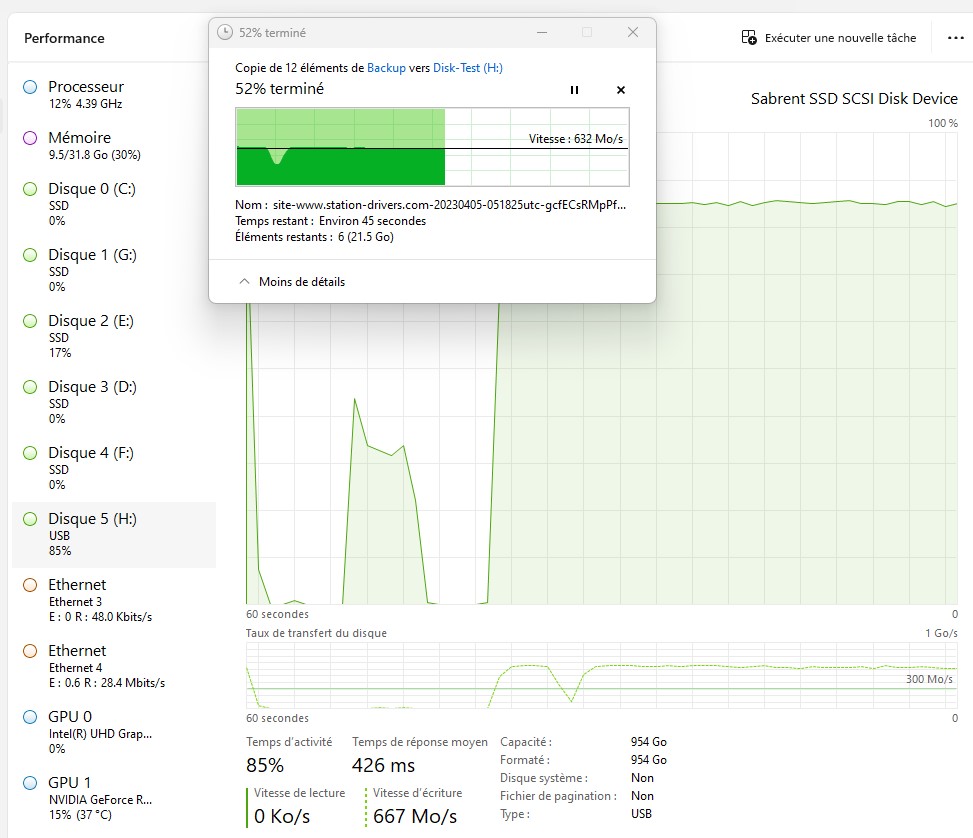
Ok I did a test with several 4GB files, no problem average transfer rate 600MB/s
Asus Z890 ProArt, Intel Cpu Core Ultra 7 265K, Memoires 32Go Corsair DDR5 (6000Mhz CL30), Water-cooling Thermaright, nVidia Geforce RTX4060, Alimentation Gigabyte 850W, Samsung SSD 990 Pro, SSD9100 Pro, Steelserie Pro , Souris Razer, Boitier HUMMER, HP Steelserie, Free Fibre Ultra (8Go/8Go), Lan 10Gb, Cable CAT8/7, Switch 10/5/2.5Gbps, Casque Philips Fedelis.
Les utilisateur(s) suivant ont remercié: Fishwithadeagle
Connexion ou Créer un compte pour participer à la conversation.
- Fishwithadeagle
-
- Hors Ligne
- Poster 2
-
Enregistré
- Messages : 6
- Thanks: 0
Re: NVME USB drives Realtek RTL9210/RTL9220 Firmware Version 1.xx
il y a 2 ans 9 mois
What drive do you have in there? I would love to get that kind of consistent performance out of my drive.
Connexion ou Créer un compte pour participer à la conversation.
- admin
-
Auteur du sujet
- Hors Ligne
- Admin
-
Administrateur
- Fdrsoft (Admin)
- Messages : 671
- Thanks: 421
Re: NVME USB drives Realtek RTL9210/RTL9220 Firmware Version 1.xx
il y a 2 ans 9 mois
here it is the disc
Station-Drivers - Test ASUS TUF Gaming A1
Station-Drivers - Test ASUS TUF Gaming A1
Asus Z890 ProArt, Intel Cpu Core Ultra 7 265K, Memoires 32Go Corsair DDR5 (6000Mhz CL30), Water-cooling Thermaright, nVidia Geforce RTX4060, Alimentation Gigabyte 850W, Samsung SSD 990 Pro, SSD9100 Pro, Steelserie Pro , Souris Razer, Boitier HUMMER, HP Steelserie, Free Fibre Ultra (8Go/8Go), Lan 10Gb, Cable CAT8/7, Switch 10/5/2.5Gbps, Casque Philips Fedelis.
Connexion ou Créer un compte pour participer à la conversation.
Temps de génération de la page : 0.083 secondes