



Marvell/Aquantia AQC113, AQC113C, AQC113CS (10Gbps) Firmware Version 1.5.48
- admin
-
 Topic Author
- Offline
- Admin
-

Administrateur
- Fdrsoft (Admin)
- Posts: 671
- Thanks: 421
Re: Marvell/Aquantia AQC113, AQC113C, AQC113CS (10Gbps) Firmware Version 1.5.48
2 months 2 weeks ago - 2 months 2 weeks ago
Hi, yes, I have the Z890 ProArt—it's a really good motherboard. As for ASPM, I haven't checked, but my PC gives me fewer issues with sleep mode now; it goes into sleep mode without any problems.
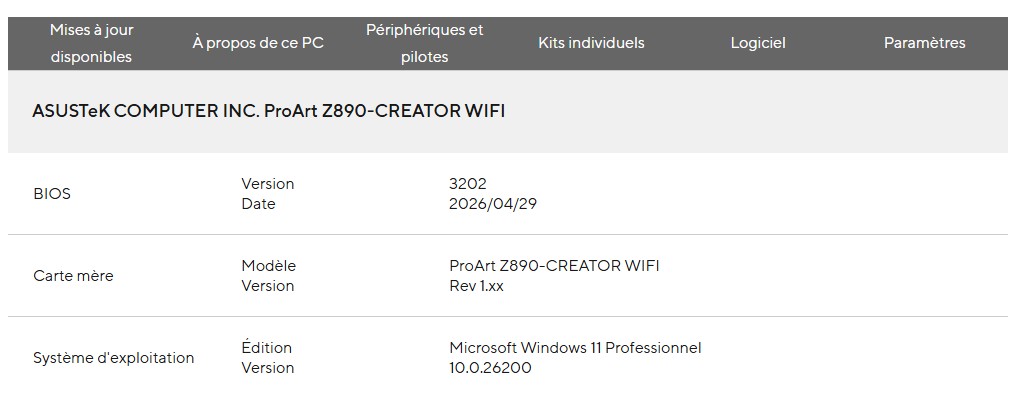
Asus Z890 ProArt, Intel Cpu Core Ultra 7 265K, Memoires 32Go Corsair DDR5 (6000Mhz CL30), Water-cooling Thermaright, nVidia Geforce RTX4060, Alimentation Gigabyte 850W, Samsung SSD 990 Pro, SSD9100 Pro, Steelserie Pro , Souris Razer, Boitier HUMMER, HP Steelserie, Free Fibre Ultra (8Go/8Go), Lan 10Gb, Cable CAT8/7, Switch 10/5/2.5Gbps, Casque Philips Fedelis.
Last edit: 2 months 2 weeks ago by admin.
Please Connexion or Create an account to join the conversation.
- chilli8733
-

- Offline
- Newbie
-

Enregistré
- Posts: 1
- Thanks: 0
Re: Marvell/Aquantia AQC113, AQC113C, AQC113CS (10Gbps) Firmware Version 1.5.48
2 months 1 day ago - 2 months 1 day ago
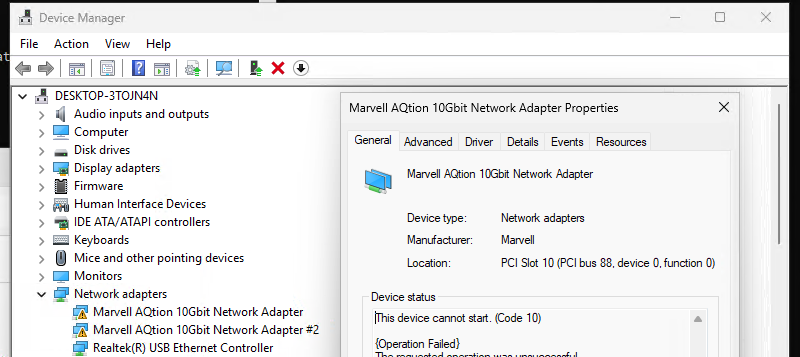
How can I flash this onto dual 10G? Is this the wrong firmware?
I have the "This device cannot start. (Code 10)" Issue.
Device is a "UGREEN NASync DXP6800 Pro".
It might be bricked?
Code:
[INFO] Checking for Marvell network driver...
[DEBUG] PnpDevice Query completed for Marvell devices
[DEBUG] Found devices count: 2
[SUCCESS] Found 2 Marvell device(s)
Device #1
Device ID: PCI\VEN_1D6A&DEV_04C0&SUBSYS_00011D6A&REV_03\4&31FB88A&0&00E6
Driver Version: 3.1.11.0
Provider: Marvell
INF File: oem1.inf
Status: Version OK (3.1.11.0 >= 3.1.11)
Device #2
Device ID: PCI\VEN_1D6A&DEV_04C0&SUBSYS_00011D6A&REV_03\4&2570C98F&0&00E4
Driver Version: 3.1.11.0
Provider: Marvell
INF File: oem1.inf
Status: Version OK (3.1.11.0 >= 3.1.11)
[SUCCESS] Driver version check passed
[INFO] Enumerating NDISIO devices...
[DEBUG] Executing: C:\Users\me\Downloads\40d1b2d8Marvell_AQC113_1.5.18(station-drivers.com)\FirmwareUpdate_v1.5.48\listDevices.exe
[DEBUG] listDevices.exe output: listDevices x86_64-w64-mingw32-5.0-3-gfaad6c70 Available devices for NDISIO family: NDISIO:04C0-058:00.0 NDISIO:04C0-057:00.0
[DEBUG] Parsed NDISIO device IDs: NDISIO:04C0-058:00.0 NDISIO:04C0-057:00.0
[SUCCESS] Found 2 NDISIO device(s)
[INFO] Checking for Dual 10G devices...
[DEBUG] Device: NDISIO:04C0-058:00.0, Bus Number: 88 (0x058)
[DEBUG] Device: NDISIO:04C0-057:00.0, Bus Number: 87 (0x057)
[DEBUG] Found Dual 10G adapter: NDISIO:04C0-058:00.0 (0x58) and NDISIO:04C0-057:00.0 (0x57)
[DEBUG] Found Dual 10G adapter: NDISIO:04C0-057:00.0 (0x57) and NDISIO:04C0-058:00.0 (0x58)
[INFO] Will process 0 standalone device(s)
I have the "This device cannot start. (Code 10)" Issue.
Device is a "UGREEN NASync DXP6800 Pro".
It might be bricked?
Code:
.\kickstart2.exe -v
kickstart2 x86_64-w64-mingw32-4.10-110-g0d62bf7
Connected to device '0000-58:00.0'
Register 0x00003048: 0xffffffff : 11111111 11111111 11111111 11111111
Register 0x00003040: 0x00000001 written
Register 0x00003040: 0xffffffff : 11111111 11111111 11111111 11111111
Register 0x00003040: 0xffffffff : 11111111 11111111 11111111 11111111
Register 0x00003040: 0xffffffff : 11111111 11111111 11111111 11111111
Register 0x00003040: 0xffffffff : 11111111 11111111 11111111 11111111
Last edit: 2 months 1 day ago by chilli8733.
Please Connexion or Create an account to join the conversation.
- jmsth
-
- Offline
- Newbie
-
Enregistré
- Posts: 2
- Thanks: 0
Re: Marvell/Aquantia AQC113, AQC113C, AQC113CS (10Gbps) Firmware Version 1.5.48
2 months 1 day agoAgreed, it's a great board. Based on your comments, I tried it. I was able to upgrade my Z890 ProArt as well. Sadly, this does not support ASPM. After completing the upgrade, this is what I see in Linux:Hi, yes, I have the Z890 ProArt—it's a really good motherboard. As for ASPM, I haven't checked, but my PC gives me fewer issues with sleep mode now; it goes into sleep mode without any problems.
Code:
84:00.0 Ethernet controller: Aquantia Corp. AQtion AQC113 NBase-T/IEEE 802.3an Ethernet Controller [Antigua 10G] (rev 03)
DeviceName: AQC113CS 10G LAN
Subsystem: ASUSTeK Computer Inc. Device 8890
Capabilities: [70] Express (v2) Endpoint, IntMsgNum 0
LnkCtl: ASPM Disabled; RCB 64 bytes, LnkDisable- CommClk+
ExtSynch- ClockPM+ AutWidDis- BWInt- AutBWInt- FltModeDis-
I was able to apply the older "Dirty Wake" version (from Shonk/Arie) and that looks better:
Code:
LnkCtl: ASPM L1 Enabled; RCB 64 bytes, LnkDisable- CommClk+
ExtSynch- ClockPM+ AutWidDis- BWInt- AutBWInt-
Hopefully someone can get Fenvi to pick up the new firmware version and release their corresponding "Dirty Wake" variant to restore ASPM support. I'm asking ASUS the same.
PS: for those of you trying to apply this to two cards, your best option is to disable one in the BIOS as the flash always works with the first card it sees.
Please Connexion or Create an account to join the conversation.
- misal1337
-

- Offline
- Poster
-

Enregistré
- Posts: 28
- Thanks: 5
Re: Marvell/Aquantia AQC113, AQC113C, AQC113CS (10Gbps) Firmware Version 1.5.48
2 months 1 day ago - 2 months 1 day ago
@chilli8733
Yup. I bricked my QNAP Dual 10G card as this firmware is all pretentious about knowing how to update dual 10G cards but borks them totally.
To all reading this: Do not update your Dual 10G cards with this or previous firmware. The updater is not designed to update firmware in such scenario. If you have firmware dump of previous firmware and know how to reflash it using the JTAG debugging tools then be my guest !
You have been warned.
Yup. I bricked my QNAP Dual 10G card as this firmware is all pretentious about knowing how to update dual 10G cards but borks them totally.
To all reading this: Do not update your Dual 10G cards with this or previous firmware. The updater is not designed to update firmware in such scenario. If you have firmware dump of previous firmware and know how to reflash it using the JTAG debugging tools then be my guest !
You have been warned.
Last edit: 2 months 1 day ago by misal1337.
Please Connexion or Create an account to join the conversation.
Time to create page: 0.083 seconds