



Intel Chipset Installation Utility and Driver 10.1.20524.8822 (21.05.2026)
- fikotr74
-
 Topic Author
- Offline
- Big Poster
-

Enregistré
- Posts: 75
- Thanks: 63
Intel Chipset Installation Utility and Driver 10.1.20524.8822 (21.05.2026)
1 day 4 hours ago - 3 hours 11 minutes ago
Intel Chipset Installation Utility and Driver 10.1.20524.8822 (21.05.2026)
HP - DOWNLOAD :
sp173080 ( 772 KB ) - Release Notes
sp173237 ( 888 KB ) - Release Notes
HP - DOWNLOAD :
sp173080 ( 772 KB ) - Release Notes
sp173237 ( 888 KB ) - Release Notes
Last edit: 3 hours 11 minutes ago by fikotr74.
The following user(s) said Thank You: duttyend
Please Connexion or Create an account to join the conversation.
- FirstEver
-

- Offline
- Big Poster
-
Enregistré
- Posts: 60
- Thanks: 119
Re: Intel Chipset Installation Utility and Driver 10.1.20524.8822 (21.05.2026)
1 day 3 hours ago - 7 hours 22 minutes ago
Ah, look — HP, the only OEM with a brain.
While Intel ships a 107 MB monstrosity, HP bravely presents its own installer: a lean 0.7 MB executable named sp173080.exe. Genius. Of course, if you actually extract it, you'll find a src folder containing installdrv.cmd and a Driver subfolder with all the INF files. No magic. No secrets. Just a batch script that calls pnputil /add-driver /install on every INF it finds.
And here's the best part: HP doesn't even try to hide how it works.
They literally sort the INFs — base drivers first, then Extension, then Software Component — and if a drvorder.txt exists, they blindly follow that order. So much for "hardware detection." I proved in my article that Intel Chipset Device Software doesn't actually detect anything. It just dumps INFs and lets Windows match HWIDs. You know, like pnputil /i /a "Drivers\*.inf" /subdirs. HP does exactly the same thing, just wrapped in a 0.7 MB SFX archive. Their script executes Pnputil.exe /add-driver "driver.inf" /install for each INF — functionally identical to a single pnputil /add-driver *.inf /subdirs /install.
So no, HP didn't reinvent the wheel. They just painted it grey and called it Proprietary OEM Innovation™.
But wait — it gets even better.
HP's version 10.1.20524.8822 ships with only 15 INF files (154 KB). Intel's official 10.1.20490.8818 contains 102 INF files (729 KB) — covering far more platforms. HP cut the installer size from 107 MB to 0.7 MB, which is nice… but trimming 575 KB worth of INF files is just weird. Why drop support for older chipsets? That's not optimisation; that's just laziness with a ribbon on top.
So here's my final dose of sarcasm:
If you want a tool that actually detects your hardware, doesn't blindly flood the Driver Store, supports everything from Sandy Bridge onward, and weighs only 743 KB (yes, smaller than HP's 772 KB masterpiece), feel free to visit my project: Universal Intel Chipset Device Updater . Almost 60,000 downloads and counting. Unlike Intel's or HP's pseudo-installers, this one doesn't pretend. It detects. It updates. It works.
But hey, HP — I've got to give you credit: at least you're using your brain.
UPDATE #1
Here's the INF comparison between HP's installer version 10.1.20524.8822 and Intel's installer version 10.1.20490.8818:
HP added WildcatLakeSystem.inf version 10.1.59.12, which wasn't present in Intel's installer 10.1.20490.8818.
UPDATE #2
Universal Intel Chipset Device Updater now supports Wildcat Lake platforms!
While Intel ships a 107 MB monstrosity, HP bravely presents its own installer: a lean 0.7 MB executable named sp173080.exe. Genius. Of course, if you actually extract it, you'll find a src folder containing installdrv.cmd and a Driver subfolder with all the INF files. No magic. No secrets. Just a batch script that calls pnputil /add-driver /install on every INF it finds.
And here's the best part: HP doesn't even try to hide how it works.
They literally sort the INFs — base drivers first, then Extension, then Software Component — and if a drvorder.txt exists, they blindly follow that order. So much for "hardware detection." I proved in my article that Intel Chipset Device Software doesn't actually detect anything. It just dumps INFs and lets Windows match HWIDs. You know, like pnputil /i /a "Drivers\*.inf" /subdirs. HP does exactly the same thing, just wrapped in a 0.7 MB SFX archive. Their script executes Pnputil.exe /add-driver "driver.inf" /install for each INF — functionally identical to a single pnputil /add-driver *.inf /subdirs /install.
So no, HP didn't reinvent the wheel. They just painted it grey and called it Proprietary OEM Innovation™.
But wait — it gets even better.
HP's version 10.1.20524.8822 ships with only 15 INF files (154 KB). Intel's official 10.1.20490.8818 contains 102 INF files (729 KB) — covering far more platforms. HP cut the installer size from 107 MB to 0.7 MB, which is nice… but trimming 575 KB worth of INF files is just weird. Why drop support for older chipsets? That's not optimisation; that's just laziness with a ribbon on top.
So here's my final dose of sarcasm:
If you want a tool that actually detects your hardware, doesn't blindly flood the Driver Store, supports everything from Sandy Bridge onward, and weighs only 743 KB (yes, smaller than HP's 772 KB masterpiece), feel free to visit my project: Universal Intel Chipset Device Updater . Almost 60,000 downloads and counting. Unlike Intel's or HP's pseudo-installers, this one doesn't pretend. It detects. It updates. It works.
But hey, HP — I've got to give you credit: at least you're using your brain.
UPDATE #1
Here's the INF comparison between HP's installer version 10.1.20524.8822 and Intel's installer version 10.1.20490.8818:
- AlderLakeDmaSecExtension.inf - 10.1.45.10 (HP) / 10.1.45.10 (Intel)
- AlderLakePCH-NDmaSecExtension.inf - 10.1.50.8 (HP) / 10.1.50.8 (Intel)
- AlderLakePCH-NSystem.inf - 10.1.50.8 (HP) / 10.1.50.8 (Intel)
- AlderLakePCH-NSystemNorthpeak - 10.1.50.8 (HP) / 10.1.50.8 (Intel)
- AlderLakePCH-PDmaSecExtension.inf - 10.1.36.7 (HP) / 10.1.36.7 (Intel)
- AlderLakePCH-PSystem.inf - 10.1.36.7 (HP) / 10.1.36.7 (Intel)
- AlderLakePCH-PSystemLPSS.inf - 10.1.36.7 (HP) / 10.1.36.7 (Intel)
- AlderLakePCH-PSystemNorthpeak.inf - 10.1.36.7 (HP) / 10.1.36.7 (Intel)
- AlderLakeSystem.inf - 10.1.45.10 (HP) / 10.1.45.10 (Intel)
- AlderLakeSystemNorthpeak.inf- 10.1.45.10 (HP) / 10.1.45.10 (Intel)
- ArrowLakeSystem.inf - 10.1.57.6 (HP) / 10.1.57.6 (Intel)
- PantherLakeSystem.inf - 10.1.56.28 (HP) / 10.1.56.28 (Intel)
- PantherLakeSystemNorthpeak.inf - 10.1.56.28 (HP) / 10.1.56.28 (Intel)
- RaptorLakeSystem.inf - 10.1.49.12 (HP) / 10.1.49.12 (Intel)
- WildcatLakeSystem.inf - 10.1.59.12 (HP) / None (Intel)
HP added WildcatLakeSystem.inf version 10.1.59.12, which wasn't present in Intel's installer 10.1.20490.8818.
Everything else is either identical.%PCI\VEN_8086&DEV_4D22Desc%=Needs_NO_DRV,PCI\VEN_8086&DEV_4D22
%PCI\VEN_8086&DEV_4D23Desc%=Needs_NO_DRV,PCI\VEN_8086&DEV_4D23
%PCI\VEN_8086&DEV_4D71Desc%=Needs_NO_DRV,PCI\VEN_8086&DEV_4D71
%PCI\VEN_8086&DEV_4D48&SUBSYS_FF008086Desc%=Needs_NO_DRV,PCI\VEN_8086&DEV_4D48&SUBSYS_FF008086
UPDATE #2
Universal Intel Chipset Device Updater now supports Wildcat Lake platforms!
Last edit: 7 hours 22 minutes ago by FirstEver.
The following user(s) said Thank You: admin, duttyend, fikotr74
Please Connexion or Create an account to join the conversation.
- SM-003
-

- Offline
- Moderator Global
-

Enregistré
- Posts: 38
- Thanks: 32
Re: Intel Chipset Installation Utility and Driver 10.1.20524.8822 (21.05.2026)
12 hours 58 minutes ago
Did Intel release this v10.1.20524.8822 officially?
System H/W Specifications

Please Connexion or Create an account to join the conversation.
- FirstEver
-
- Offline
- Big Poster
-
Enregistré
- Posts: 60
- Thanks: 119
Re: Intel Chipset Installation Utility and Driver 10.1.20524.8822 (21.05.2026)
7 hours 33 minutes ago - 6 hours 34 minutes ago
Did Intel officially release 10.1.20524.8822?
Here’s what I’ve found so far:
A few manufacturers have started showing off new Wildcat Lake based devices – for example, the Honor Notebook X14 2026 (Core 5 320), ASUS Fearless 14SE 2026, and HP OmniBook 3. But most of them don’t even have official product pages yet. The only live one I could find is Honor’s Chinese store: www.honor.com/cn/shop/product/10086472554641.html
Drivers or INFs?
Nowhere to be found – except for that HP installer ( sp173080.exe ) dug up from their FTP. I don’t think it’s listed on any official HP support page yet.
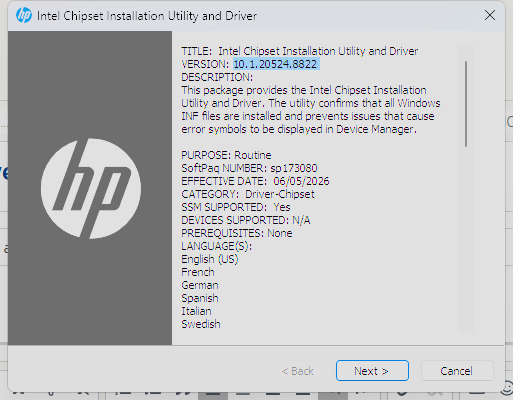
What’s interesting is that the internal manifest of sp173080.exe says it’s based on version 10.1.20524.8822 – but that version isn’t available anywhere else. Not on Intel’s site, not on the Windows Update Catalog, and not even as an inbox driver in the latest Canary builds of Windows. One more technical note about the HP package: WildcatLakeSystem.inf itself is not digitally signed by Microsoft. That might sound alarming, but it’s actually fine – because the accompanying wildcatlake.cat file is signed, and it ensures the INF’s hash matches. So Windows will accept it during installation.
Bottom line: This hardware is so new that if you buy one of these laptops and try to install a fresh copy of Windows, you won’t have any chipset INF files available – unless you grab this HP installer or use my updater.
So no, Intel hasn’t officially released 10.1.20524.8822 to the public.
HP just quietly baked it into their own package, probably for internal testing or early OEM enablement.
Here’s what I’ve found so far:
A few manufacturers have started showing off new Wildcat Lake based devices – for example, the Honor Notebook X14 2026 (Core 5 320), ASUS Fearless 14SE 2026, and HP OmniBook 3. But most of them don’t even have official product pages yet. The only live one I could find is Honor’s Chinese store: www.honor.com/cn/shop/product/10086472554641.html
Drivers or INFs?
Nowhere to be found – except for that HP installer ( sp173080.exe ) dug up from their FTP. I don’t think it’s listed on any official HP support page yet.
What’s interesting is that the internal manifest of sp173080.exe says it’s based on version 10.1.20524.8822 – but that version isn’t available anywhere else. Not on Intel’s site, not on the Windows Update Catalog, and not even as an inbox driver in the latest Canary builds of Windows. One more technical note about the HP package: WildcatLakeSystem.inf itself is not digitally signed by Microsoft. That might sound alarming, but it’s actually fine – because the accompanying wildcatlake.cat file is signed, and it ensures the INF’s hash matches. So Windows will accept it during installation.
Bottom line: This hardware is so new that if you buy one of these laptops and try to install a fresh copy of Windows, you won’t have any chipset INF files available – unless you grab this HP installer or use my updater.
So no, Intel hasn’t officially released 10.1.20524.8822 to the public.
HP just quietly baked it into their own package, probably for internal testing or early OEM enablement.
Last edit: 6 hours 34 minutes ago by FirstEver.
The following user(s) said Thank You: fikotr74
Please Connexion or Create an account to join the conversation.
Time to create page: 0.078 seconds